Quick Summary: Top 10 ERP Systems of 2026
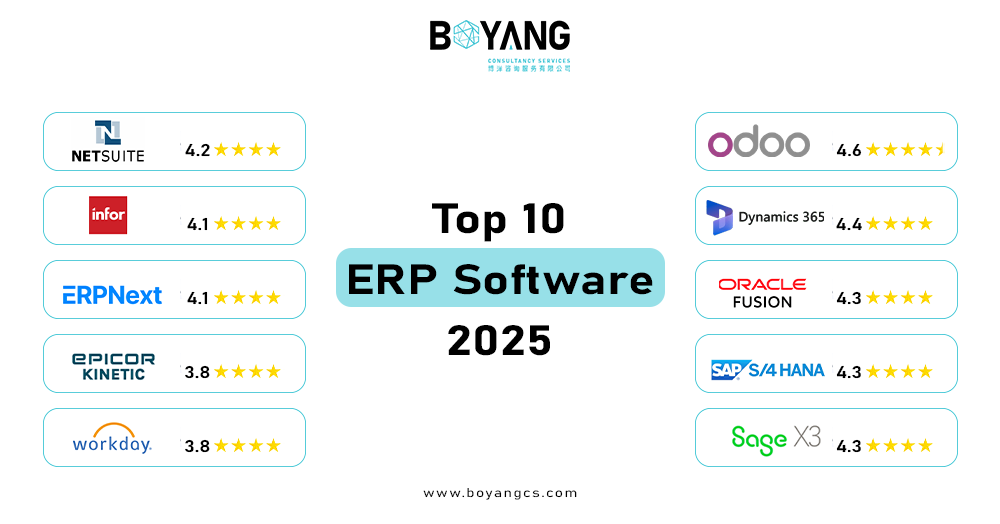
| ERP System | Best For | Starting Price | User Rating |
|---|---|---|---|
| Odoo | Startups, SMEs, growing enterprises | $24.90/user/month | 4.6/5 |
| Microsoft Dynamics 365 | Microsoft-ecosystem businesses | $70/user/month (Business Central), $180/user/month (Finance) | 4.4/5 |
| Oracle NetSuite | Mid-market to large businesses | About $1,000/month base | 4.2/5 |
| SAP S/4HANA | Large enterprise manufacturing | Custom (typically $100k+/year) | 4.3/5 |
| Oracle Fusion Cloud ERP | Global enterprises | About $50/user/month | 4.3/5 |
| Infor CloudSuite | Industry-specific manufacturing | Custom quote | 4.1/5 |
| Epicor Kinetic | Discrete and process manufacturers | About $175/user/month | 3.8/5 |
| Acumatica Cloud ERP | SMBs needing flexibility | Custom (consumption-based) | 4.2/5 |
| ERPNext | Budget-conscious SMEs | From $10/user/month | 4.1/5 |
| Sage X3 | Mid-market finance and operations | Custom quote | 4.3/5 |
User ratings reflect average scores from G2, Capterra, and TrustRadius as of Q3 2026. Prices come from vendor websites as of October 2026. ERP pricing varies by modules, user count, and deployment type, so always request a custom quote.
Top 5 ERP Systems in 2026
Short on time? These five ERP systems cover most business needs.
| Rank | ERP system | Best for | Starting price |
|---|---|---|---|
| 1 | Odoo | Startups, SMEs, and growing companies | $24.90/user/month |
| 2 | Microsoft Dynamics 365 | Businesses on Microsoft 365 and Azure | $70/user/month (Business Central) |
| 3 | Oracle NetSuite | Mid-market cloud ERP with strong finance | About $1,000/month base fee |
| 4 | SAP S/4HANA | Large enterprises and manufacturers | Custom, often $100,000+ per year |
| 5 | Acumatica Cloud ERP | SMBs wanting flexible pricing | About $1,800/month |
SAP, Oracle, and Microsoft are the biggest ERP vendors, and they sell mainly to mid-size and large organizations. Odoo and Acumatica reach smaller teams. Read the full reviews below for strengths, weaknesses, and who should skip each one. Want every vendor in one table? See our ERP systems comparison by industry and price.
Detailed ERP Reviews
1. Odoo
Best for: Startups, SMEs, and growing companies wanting one unified platform
Odoo’s modular design lets you start with accounting and inventory, then add CRM, manufacturing, HR, or e-commerce as you grow, without switching platforms. This makes it accessible for smaller businesses who do not need a full enterprise suite on day one.
What works well: The interface is modern and intuitive next to legacy ERPs. The 70+ modules cover nearly every business function, and the free Community edition gives very small teams a starting point. Implementation is faster than SAP or Oracle for comparable scope. See how Odoo implementation works with a partner.
Where it falls short: The Community edition lacks multi-company management and advanced accounting. Compare both editions in our Odoo Community vs Enterprise guide. Some modules are less mature than specialist tools, such as its project management next to Asana. Customization gets complex when your workflows are non-standard.
Pricing: Community edition is free. Enterprise starts at $24.90 per user per month on the cloud, with pricing varying by modules.
Not a good fit for: Large enterprises in heavily regulated industries, such as aerospace and defense, which need the compliance depth of SAP S/4HANA.
2. Microsoft Dynamics 365
Best for: Mid-size to large businesses already running Microsoft 365 or Azure
Dynamics 365 is a suite of modular applications covering Finance, Supply Chain, Sales, Customer Service, and more. Its core strength is deep integration with Teams, Outlook, Excel, and Power BI, so users work in tools they already know. Microsoft’s Copilot features now sit across the suite and automate forecasting, anomaly detection, and report generation.
What works well: If your organization is Microsoft-native, the integration effort drops sharply. Licensing flexibility lets you start with specific modules. Power Platform (Power Automate and Power Apps) extends the system without custom code.
Where it falls short: The breadth of the suite makes correct configuration difficult. Implementations often run over budget and timeline without experienced partners. Licensing costs add up fast when you combine several Dynamics 365 apps.
Pricing: Dynamics 365 Finance starts at $180 per user per month. Business Central, built for SMBs, starts at $70 per user per month. The $65 figure often quoted online covers standalone Sales modules only.
Not a good fit for: Businesses outside the Microsoft ecosystem and companies seeking a quick, low-cost deployment.
3. Oracle NetSuite
Best for: Growing mid-market businesses needing cloud-native ERP with strong financials
NetSuite was cloud-native before cloud was mainstream. Its financial management is best-in-class for companies with complex global structures, including multi-currency, multi-subsidiary, revenue recognition, and automated consolidations. The built-in SuiteCommerce module suits businesses with large e-commerce operations.
What works well: Real-time dashboards with role-based views give executives and department heads instant visibility. Fixed-asset management and revenue recognition handle compliance scenarios smaller ERPs struggle with. The partner ecosystem is strong for industry-specific customization.
Where it falls short: The interface feels dated next to Odoo or Acumatica. SuiteScript customization needs specialist developers. Pricing is opaque, and the published base fee is only a starting point. Most mid-market deployments cost far more. Read our Odoo vs NetSuite guide to see how the two compare.
Pricing: The base license starts around $1,000 per month plus per-user fees, typically $99 to $129 per user per month. A 50-user mid-market deployment typically costs $75,000 to $150,000 per year.
Not a good fit for: Manufacturers needing deep production scheduling and very small businesses for whom the cost is too high.
4. SAP S/4HANA
Best for: Large enterprises in manufacturing, logistics, and regulated industries
SAP S/4HANA is the gold standard for enterprise complexity. Its in-memory HANA database runs real-time analytics across billions of records. This is why it leads in automotive, aerospace, chemicals, and pharmaceuticals, where production planning, compliance, and supply chain traceability are non-negotiable.
What works well: Unmatched depth in manufacturing (PP), materials management (MM), and financial controlling (CO/FI). The global partner and talent ecosystem is vast, so an unusual requirement usually has an SAP-certified answer.
Where it falls short: Implementation is complex and costly. Projects routinely take 12 to 36 months and cost millions once you add consulting, licensing, and infrastructure. The interface, even with SAP Fiori, needs substantial user training. It is unsuitable for businesses below a certain scale.
Pricing: SAP does not publish list prices. Enterprise licenses are negotiated and typically start from $100,000 per year for smaller deployments, then reach millions for large rollouts. The $10,000 per year figure in some online tables is misleading and covers specific starter packages only. For a four-platform price view, see our Odoo vs SAP vs NetSuite vs Microsoft Dynamics 365 cost comparison.
Not a good fit for: SMEs, businesses without dedicated IT resources, and companies that need to go live in under six months.
5. Oracle Fusion Cloud ERP
Best for: Large global organizations needing unified financials and advanced analytics
Oracle Fusion Cloud ERP is Oracle’s next-generation cloud platform, separate from the older Oracle E-Business Suite. Its strength is financial management at scale, including multi-entity consolidation, predictive planning through Oracle Analytics, and AI-powered accounts payable automation. Its embedded AI for anomaly detection in financial data is among the most mature in the industry.
What works well: Procurement, project portfolio management, and risk management are enterprise-grade. The platform handles complex intercompany transactions and global tax compliance well.
Where it falls short: High implementation cost and complexity. It suits manufacturing-heavy use cases less than SAP does. You need experienced Oracle consultants.
Pricing: Core financials start around $50 per user per month. Full enterprise deployments cost considerably more, depending on modules.
Not a good fit for: Manufacturing-first organizations and any business without significant IT resources and budget.
6. Infor CloudSuite
Best for: Mid-to-large manufacturers and distributors in specific industries
Infor stands out for vertical depth. Instead of a generic ERP with industry add-ons, it builds industry-specific versions, including CloudSuite Industrial, CloudSuite Healthcare, and CloudSuite Food and Beverage. Each arrives pre-configured with the workflows, compliance rules, and KPIs for its sector. This cuts implementation time and customization cost compared to horizontal platforms.
What works well: Industry-specific functionality out of the box. Strong supply chain and warehouse management. The Coleman AI layer adds predictive maintenance and demand forecasting for manufacturers.
Where it falls short: Infor is less known than SAP or Oracle, so the talent pool for implementation and support is smaller. The interface has improved but still trails more modern platforms.
Pricing: Custom quote required. Plans typically start at $800 per month and scale with users and modules.
Not a good fit for: Businesses outside Infor’s target verticals and companies needing a broad horizontal ERP.
7. Epicor Kinetic
Best for: Discrete and process manufacturers seeking production-focused ERP
Epicor Kinetic, formerly Epicor ERP, is purpose-built for manufacturers. Its job costing, shop floor control, production scheduling, and quality management modules are deep and well integrated, built on decades of manufacturing focus. The cloud-native Kinetic rebrand brings a modern web interface to what was a thick-client application.
What works well: Strong MES (Manufacturing Execution System) integration. Detailed cost tracking across materials, labor, and overhead. Good fit for engineer-to-order, make-to-order, and repetitive manufacturing. Smaller manufacturers should also read our guide to Odoo ERP for manufacturing companies.
Where it falls short: The financial and HR modules trail its manufacturing core. Implementation needs experienced Epicor partners. It suits service businesses less.
Pricing: About $175 per user per month, though cloud pricing varies by deployment.
Not a good fit for: Service companies, retail businesses, and organizations where manufacturing is not the core operation.
8. Acumatica Cloud ERP
Best for: SMBs and mid-market companies needing flexible, scalable cloud ERP
Acumatica’s most distinctive feature is consumption-based pricing. You pay for the resources you use, not per user. This suits businesses with many occasional users, such as field staff who log in to submit expenses, who would face high per-seat costs under traditional models.
What works well: Modern, browser-native interface. Strong project accounting, distribution, and construction modules. An open API makes third-party integration simple. Real flexibility in deployment, with cloud, on-premise, and hybrid options. See how it compares in our Odoo vs Acumatica guide.
Where it falls short: Less brand recognition than competitors, which complicates internal buy-in. Fewer pre-built industry configurations than Infor.
Pricing: Consumption-based and customized, typically starting around $1,800 per month for small deployments. Per-user comparisons are not straightforward.
Not a good fit for: Very large enterprises needing SAP-grade complexity and businesses wanting simple per-user pricing.
9. ERPNext
Best for: Budget-conscious startups and SMEs willing to invest in configuration
ERPNext is the leading open-source ERP platform, built on the Frappe framework. The hosted version, Frappe Cloud, starts at $10 per user per month, far below any proprietary alternative. It covers accounting, inventory, CRM, HR, manufacturing, and project management, a wide scope for the price.
What works well: No license cost if you self-host. Active open-source community and frequent updates. Capable for its price point. A good fit for businesses in emerging markets where large ERP licenses cost too much.
Where it falls short: Self-hosting needs technical expertise. Support quality varies with your implementation partner. The interface is less polished than commercial alternatives. It does not suit highly complex enterprise requirements.
Pricing: Free to self-host. Frappe Cloud hosted plans start at $10 per user per month.
Not a good fit for: Enterprises needing enterprise-grade SLAs and businesses without technical staff to manage an open-source deployment.
10. Sage X3
Best for: Mid-market businesses in manufacturing, distribution, and food and beverage
Sage X3 targets companies that have outgrown entry-level accounting software but do not need the full complexity of SAP. It offers strong financial management, multi-site inventory, and production management in a package built for mid-market timelines.
What works well: Solid finance and compliance features for mid-market needs. Good multilingual and multi-currency support for regional operations. Faster implementation than tier-1 ERPs.
Where it falls short: Less powerful than Epicor or SAP for complex manufacturing. The ecosystem is smaller, so fewer third-party integrations exist. Sage’s support reputation gets mixed reviews.
Pricing: Custom quote required. Typically positioned for companies with 50 to 500 employees.
Not a good fit for: Large global enterprises and businesses needing deep manufacturing execution.
Bonus: Workday for HR and Workforce Planning
Best for: Large enterprises prioritizing HR, workforce planning, and financial management
Workday is mainly an HCM (Human Capital Management) and financial management platform, not a traditional ERP. It excels at workforce analytics, headcount planning, compensation management, and financial consolidation. This makes it the pick for organizations where people costs are the main operating variable, such as professional services, financial services, and media.
Pricing: Custom. HCM typically costs $25 to $50 per user per month, and financials add significant cost.
Not a good fit for: Manufacturing, distribution, and any business needing deep supply chain or production management.
Best Cloud ERP Systems
Cloud ERP runs on the vendor’s servers, and your team logs in through a browser. You skip server costs and receive updates without upgrade projects. SaaS ERP means the same thing in most cases, because you rent the software by subscription. Oracle NetSuite is cloud-native and suits growing mid-market companies. Oracle Fusion Cloud ERP fits global organizations. Acumatica gives you cloud, on-premise, or hybrid options. Microsoft Dynamics 365 Business Central works well for Microsoft users. Odoo Online starts at $24.90 per user per month and suits smaller teams. Match the platform to your company size first, then to your budget.
Cheapest ERP Systems and What You Pay in Total
Odoo Community is free, and ERPNext is free to self-host. Hosted ERPNext on Frappe Cloud starts at $10 per user per month. Odoo Enterprise starts at $24.90 per user per month. Microsoft Dynamics 365 Business Central starts at $70 per user per month. Acumatica starts near $1,800 per month and does not charge per user.
License fees are only part of the bill. Implementation usually costs 1 to 3 times the annual license fee, so a low license price does not always mean the lowest total cost. Use our Odoo ROI calculator to estimate your return, and read our Odoo ERP implementation cost guide for project figures.
Best ERP for Accounting and Finance
Oracle NetSuite leads for multi-currency and multi-subsidiary accounting, revenue recognition, and automated consolidations. Oracle Fusion Cloud ERP handles multi-entity consolidation and AI-powered accounts payable at scale. Sage X3 gives mid-market companies solid financial management and compliance features. Microsoft Dynamics 365 Finance suits teams who work in Excel and Power BI every day. Odoo includes accounting in its core modules, which works for smaller businesses, though the Community edition lacks advanced accounting and multi-company management. Choose based on how many entities, currencies, and reporting rules you manage.
Best ERP for Large Business
Large organizations need depth, global compliance, and scale. SAP S/4HANA leads in manufacturing, logistics, and regulated industries. Oracle Fusion Cloud ERP leads in global financials and analytics. Workday fits companies where people costs drive operations, such as professional services and financial services. Infor CloudSuite suits manufacturers and distributors in specific industries. Expect long projects. SAP rollouts often run 12 to 36 months and need a dedicated partner and an internal team.
Best ERP for Supply Chain and Manufacturing
Manufacturers need production scheduling, inventory control, and cost tracking. SAP S/4HANA covers production planning, materials management, and traceability for large plants. Epicor Kinetic focuses on job costing, shop floor control, and quality management. Infor CloudSuite offers industry-specific versions and strong warehouse management. Acumatica supports distribution and project accounting. Odoo offers a lower-cost route for smaller manufacturers. If your plant sits in the region, read our page on Odoo ERP for manufacturers in Hong Kong and China. Check the manufacturing depth of every shortlisted vendor before you sign.
Easiest ERP Systems to Use
Ease of use decides whether your team adopts the system. Odoo has a modern interface that new users learn quickly. Acumatica runs in the browser with a clean layout. Microsoft Dynamics 365 feels familiar because it works with Teams, Outlook, and Excel. SAP S/4HANA needs substantial training even with its Fiori interface. NetSuite works well, but its interface looks dated next to newer platforms. Ask every vendor for a hands-on trial and let your daily users test it.
ERP Alternatives to SAP and NetSuite
SAP and NetSuite suit large and mid-size organizations with big budgets. Smaller teams have good alternatives. Odoo gives you modular apps at a lower price. Acumatica uses resource-based pricing, which helps when many people need access. ERPNext suits budget-conscious teams with technical staff. Sage X3 fits mid-market companies who want faster rollouts than SAP. Microsoft Dynamics 365 Business Central suits small and mid-size businesses already on Microsoft 365.
New and Modern ERP Systems in 2026
Modern ERP systems share four traits. They run in the cloud, connect through open APIs, add AI to forecasting and reporting, and update without major upgrade projects. Microsoft embeds Copilot across Dynamics 365. Oracle builds AI into anomaly detection and accounts payable. Infor adds Coleman AI for demand forecasting and predictive maintenance. Acumatica offers an open API for integrations. Odoo keeps adding modules, and our guide to Odoo 19 vs Odoo 20 shows what the latest release changes.
Best ERP Company in Hong Kong
The best ERP company in Hong Kong is the one that fits your size, industry, and support needs. Check four things before you choose. Look for certified partner status with the vendor. Ask for case studies from companies like yours. Confirm the team supports your time zone. Request a fixed scope and a clear go-live plan.
Boyang is a certified Odoo implementation partner serving businesses in Hong Kong and the Greater Bay Area. Read about our Odoo ERP implementation Hong Kong service, our Odoo migration service in Hong Kong, and our case studies to see how projects run.
How We Evaluated These ERP Systems
We assessed each platform on industry-specific functionality, scalability, total cost of ownership (license, implementation, and support), interface quality, integration options, and vendor stability. We reviewed ratings from G2, Capterra, and TrustRadius as of Q3 2026 and verified prices against vendor websites in October 2026. ERP pricing changes often, so treat every figure as a starting point.
How to Choose the Right ERP System
Step 1: Define Your Non-Negotiables
Before you look at any vendor, list the three to five processes most broken in your business today. An ERP solving your real problems beats one with the most features. If inventory accuracy is your core pain, prioritize strong warehouse management. If you consolidate finances across entities, prioritize multi-entity financial management.
Step 2: Be Honest About Your Budget, Including Implementation
License fees are rarely the largest cost. Implementation covers configuration, data migration, training, and go-live support, and it typically costs 1 to 3 times the annual license fee. A $500 per month license often comes with a $50,000 implementation project. Estimate your total with our Odoo ROI calculator and review real figures in our Odoo ERP implementation cost guide.
Step 3: Check the Vendor’s Industry Experience
A vendor who has implemented your type of business needs less customization and makes fewer mistakes. Ask for case studies from companies of similar size and industry. Ask what went wrong in past projects and how the team fixed it. A vendor who answers honestly is more trustworthy than one with only success stories.
Step 4: Pilot Before You Commit
Most vendors offer trial access or proof-of-concept projects. Run a representative set of your own workflows through the system before you sign. Many ERP selection regrets come from choosing on demos instead of hands-on testing.
Step 5: Plan for Adoption, Not Only Implementation
An ERP delivers value only when people use it correctly. Budget for change management, training, and a defined support period after launch. If you move from an older system, plan the data move early with an Odoo migration service in Hong Kong or another partner.
Frequently Asked Questions
Which ERP system is best?
There is no single best ERP. Odoo suits startups and SMEs. Microsoft Dynamics 365 suits Microsoft users. Oracle NetSuite suits mid-market companies. SAP S/4HANA suits large enterprises. Choose by company size, industry, budget, and growth plans.
What are the top 5 ERP systems?
Odoo, Microsoft Dynamics 365, Oracle NetSuite, SAP S/4HANA, and Acumatica Cloud ERP lead our 2026 list. Each fits a different business size. The quick summary table above shows prices and best use for each.
What is the best cloud ERP?
Oracle NetSuite is the strongest cloud-native pick for mid-market companies. Oracle Fusion Cloud ERP suits global enterprises, and Acumatica suits growing SMBs. Odoo Online and Microsoft Dynamics 365 Business Central suit smaller teams.
What is the cheapest ERP system?
Odoo Community and self-hosted ERPNext have no license fee. Hosted ERPNext starts at $10 per user per month, and Odoo Enterprise starts at $24.90 per user per month. Budget for implementation too, which often costs 1 to 3 times the annual license.
What is the best ERP for a large business?
SAP S/4HANA and Oracle Fusion Cloud ERP suit large enterprises with global operations. Workday fits HR-heavy organizations, and Infor CloudSuite fits industry-specific manufacturers. Plan for projects of 12 months or more.
What are the best alternatives to SAP and NetSuite?
Odoo, Acumatica, Microsoft Dynamics 365 Business Central, Sage X3, and ERPNext are the main options. Each suits smaller budgets or faster rollouts than SAP or NetSuite. Each has limits in depth for complex global operations. Compare two of them in our Odoo vs NetSuite and Odoo vs Acumatica guides, or see all four platforms priced in our Odoo vs SAP vs NetSuite vs Microsoft Dynamics 365 cost comparison.
Which ERP is best for accounting?
Oracle NetSuite leads for multi-entity accounting and revenue recognition. Sage X3 and Microsoft Dynamics 365 Finance suit mid-market finance teams. Odoo suits smaller businesses that want accounting and operations in one system.
Is custom ERP software better than off-the-shelf ERP?
Custom ERP software fits unusual workflows, but it costs more and takes longer to build. Platforms such as Odoo and Acumatica give you proven modules and allow tailoring at a lower cost. Many businesses start with an existing platform and add custom modules. Our custom software development team builds both.
What is the difference between cloud ERP and SaaS ERP?
The two terms usually mean the same thing. The vendor hosts the software, and you pay a subscription. Some cloud ERP platforms also offer on-premise or hybrid options, such as Acumatica.
What should businesses in the Philippines check when comparing ERP software?
Check local tax and invoicing rules, multi-currency support, and the vendor’s local partner network. Ask for references from companies in your country. Test the system with your own workflows before you sign.
What is the best ERP company in Hong Kong?
Look for a certified partner with local case studies and support in your time zone. Boyang is a certified Odoo implementation partner serving Hong Kong and the Greater Bay Area. Start with our Odoo ERP implementation Hong Kong page.
Final Thoughts
There is no universally best ERP, only the right fit for your size, industry, budget, and growth plans. Boyang specializes in ERP selection consulting and Odoo implementation. If you want an independent view on which platform fits your business, contact our team for a free initial consultation. You also see how we run projects in our case studies.