Odoo releases one major version each year. Odoo 20 launched at Odoo Experience in Brussels on September 24, 2026. If you run an older release, you need to know which Odoo versions still receive support and which ones have reached end of life.
This guide gives you the full Odoo versions list, the support rules, and a clear plan for each version you might run today.
Odoo Versions List
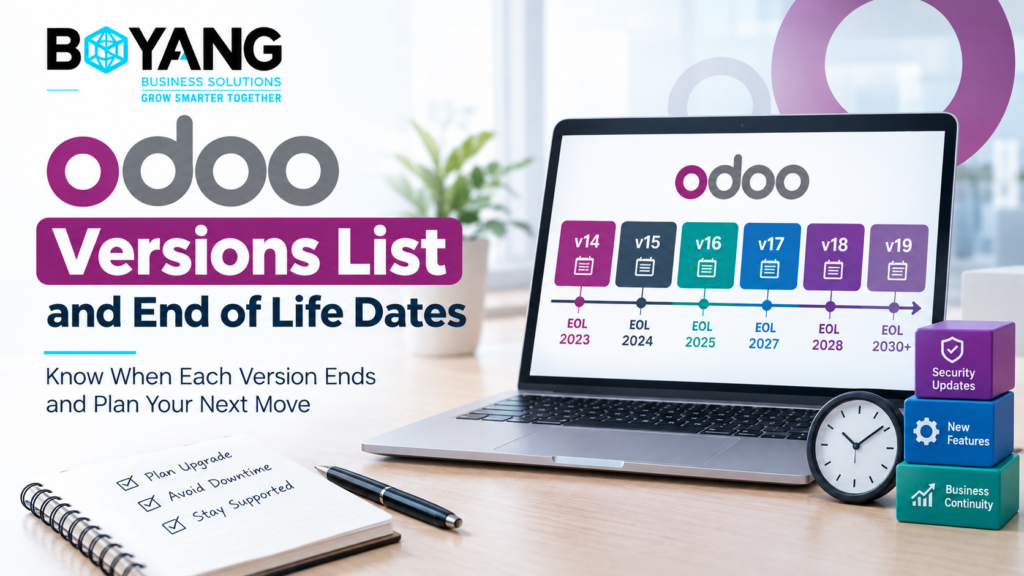
| Version | Release year | Status in November 2026 |
|---|---|---|
| Odoo 13 | 2019 | End of life |
| Odoo 14 | 2020 | End of life |
| Odoo 15 | 2021 | End of life |
| Odoo 16 | 2022 | End of life |
| Odoo 17 | 2023 | Drops out of support with the Odoo 20 launch |
| Odoo 18 | 2024 | Supported |
| Odoo 19 | 2025 | Supported |
| Odoo 20 | 2026 | Latest version |
Odoo took its current name in 2014, when it dropped the name OpenERP. Since then it has shipped a major version every year, usually around its autumn conference.
How Odoo Support Works
Odoo supports the three most recent major versions. There is no paid extended support plan. When a new version ships, the oldest of the three falls out.
Use this rule to find your status:
- Latest version, version minus one, and version minus two receive support.
- Anything older is end of life.
With Odoo 20 live, versions 18, 19, and 20 sit inside the window. Odoo 17 sits outside it. Confirm the exact cutoff dates on odoo.com before you plan a project around them.
What End of Life Means
End of life is not a soft label. It has real effects on your business:
- You receive no security patches.
- You receive no bug fixes.
- You lose access to official support.
- Official upgrade paths become harder to use.
Security matters most. Your ERP holds invoices, customer records, and bank details. An unpatched system is a risk to all of them.
Cost matters too. Each year you wait adds another version to the jump. A one-version upgrade is routine. A five-version jump becomes a project with several steps. Custom modules take the most time, because developers must port each one to the new version.
Which Odoo Version Is the Latest
Odoo 20 is the latest version. Odoo announced it at Odoo Experience 2026 in Brussels, held September 24 to 26.
Do not rush a live system onto a new major release in its first weeks. Early point releases fix bugs found by the first wave of users. Many partners wait until a release has had a few months of fixes before moving production systems. New projects have a different case, which a later section covers.
Community and Enterprise Versions
Community and Enterprise share the same version number and release schedule. Odoo 20 Community and Odoo 20 Enterprise arrive together. The difference sits in what you get around the version.
| Area | Community | Enterprise |
|---|---|---|
| Licence | Free | Per-user subscription |
| Hosting | Self-hosted | Odoo Online, Odoo.sh, or on-premise |
| Official upgrade service | Not included | Included |
| Apps | Core apps | Core apps plus extra apps and Studio |
Community users handle upgrades themselves or hire a partner. Tools such as OpenUpgrade help, but they need technical skill. Enterprise users send their database to Odoo’s upgrade service and test the result.
Odoo Online, Odoo.sh, and On-Premise
Your hosting option controls who decides the upgrade date.
- Odoo Online: Odoo schedules the move to new versions for you.
- Odoo.sh: You choose the timing and test on staging branches.
- On-premise: You own the whole process, including backups and server work.
On-premise and Odoo.sh teams carry the most responsibility. Odoo Online teams still need to test custom settings and reports after each move.
How to Check Your Odoo Version
Follow these steps:
- Log in to your Odoo database as an administrator.
- Open the Settings app.
- Scroll to the bottom of the page.
- Read the version number shown there, for example 18.0.
Write down your version, your edition, and your hosting type. Your partner needs all three to scope an upgrade.
What to Do for Each Version
| Your version | Status | Action |
|---|---|---|
| Odoo 16 or older | End of life | Plan an upgrade now. Treat it as urgent. |
| Odoo 17 | Support ending | Start planning and finish within the next few months. |
| Odoo 18 | Supported | Schedule an upgrade for next year. |
| Odoo 19 | Supported | Stay put. Review Odoo 20 after a few months of fixes. |
| Odoo 20 | Latest | Apply point releases as Odoo ships them. |
Skipping versions often costs less than upgrading every year. A jump from 16 to 19, for example, usually costs less than three separate projects. Your custom module count decides most of the price.
Starting a New Project
If you start fresh, pick a version with the longest support runway. This gives you the most years before your first upgrade. Choose your version at the start of your Odoo ERP implementation, and ask your partner to confirm module support for it.
Check every third-party app you plan to use. Each one needs a release for your chosen version. A missing module delays go-live more than any other single problem.
Version Support for Hong Kong Businesses
Many companies in Asia run older Odoo versions because they depend on custom accounting, payroll, or local reports. An Odoo Hong Kong partner reviews these customizations before an upgrade. Local rules for tax, invoicing, and payment methods often sit in custom code, so a review protects them.
Ask your partner for a module list, a test plan, and a cutover date. Run the test on a copy of your live data before you touch production.
Upgrade Checklist
- Record your current version, edition, and hosting type.
- List every custom and third-party module.
- Confirm each module has a release for the target version.
- Back up your database and files.
- Test the upgrade on a copy of your data.
- Train key users on changed screens.
- Pick a cutover date outside your busiest week.
Frequently Asked Questions
What is the latest Odoo version?
Odoo 20 is the latest version. Odoo released it in September 2026.
How long does Odoo support a version?
Odoo supports the three most recent major versions. Each version stays supported for about three years.
Is Odoo 17 end of life?
Odoo 17 falls out of the three-version window with the Odoo 20 launch. Check odoo.com for the exact date and plan your upgrade.
Does Odoo Community get official upgrades?
No. The official upgrade service belongs to Enterprise. Community users upgrade on their own or hire a partner.
Do I need to upgrade every year?
No. Many companies skip versions and upgrade every two or three years. Stay inside the support window.
Final Thoughts
Know your version. Know its end of life date. Build your upgrade plan before support ends, not after. A short audit today saves you from a rushed project later.